Every professional has been there: you leave a meeting, glance at your scribbled notes, and realize you missed half of what was discussed. According to a 2025 workplace productivity survey by Atlassian, the average knowledge worker attends 62 meetings per month and spends roughly 31 hours in those sessions. Despite that investment, 73% of professionals report losing critical action items because their notes were incomplete.
That is exactly the problem the best AI note-taking app category was built to solve. Modern AI note takers can auto-transcribe spoken words in real time, generate structured summaries, extract action items, and even translate across languages — all without you typing a single character.
In this guide, we tested and compared eight leading AI note-taking tools so you can pick the one that fits your workflow, language needs, and budget. Whether you need an ai note taker for multilingual team meetings, a meeting transcription app for lecture recordings, or a full-featured ai meeting notes platform for sales calls, you will find a clear recommendation below.
If you handle meetings or calls in more than one language, you may also want to read our breakdown of how to transcribe audio to text for free.
What Makes a Good AI Note-Taking App?
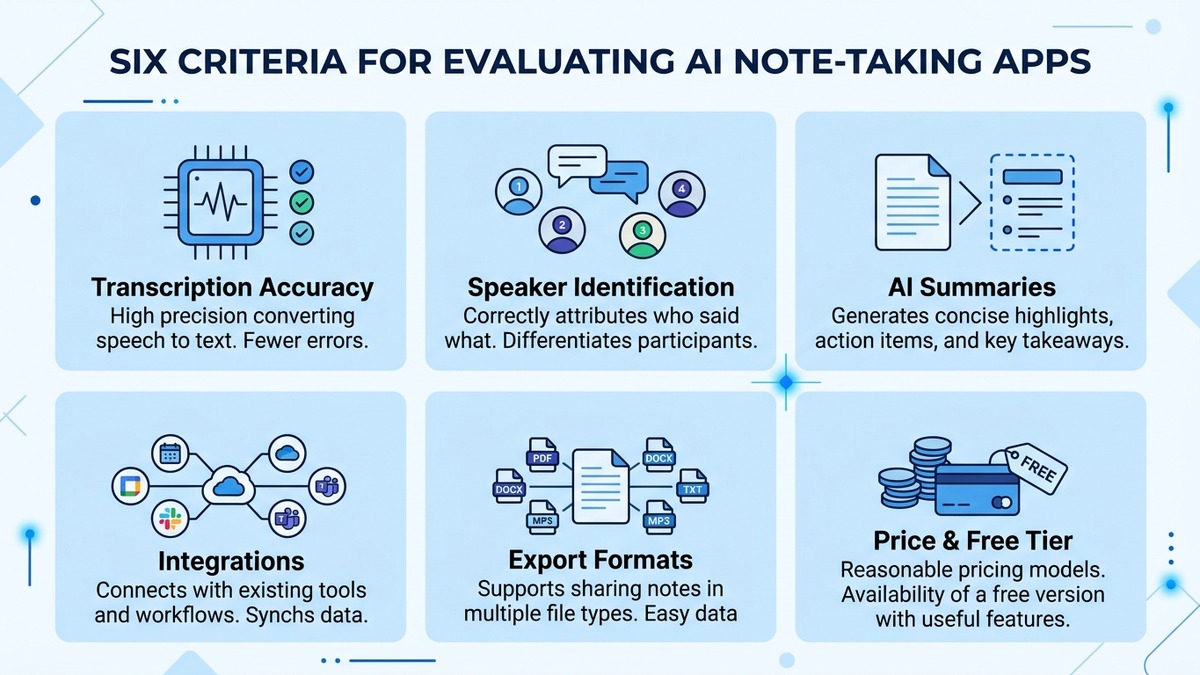
Before diving into individual reviews, it helps to establish what separates a mediocre tool from the best ai note taking app for your specific needs. We evaluated every product against six criteria.
1. Transcription Accuracy
The foundation of any ai note taking tool is its speech-to-text engine. Look for word error rates (WER) below 8% on native-speaker audio. Accented speech, technical jargon, and noisy environments are the real tests — marketing demos rarely reflect real-world conditions.
2. Real-Time vs. File-Based Processing
Some apps only process uploaded recordings after the fact. Others transcribe live audio as a meeting happens. Real-time transcription is essential if you need to follow along in a language you do not speak fluently or want to search for a point that was just made.
3. Language and Translation Support
For global teams, language coverage matters enormously. A monolingual ai note taker forces you to run separate workflows for each language. The strongest tools handle 50 or more languages and provide live translation — letting a Japanese-speaking engineer and an English-speaking product manager share the same set of ai meeting notes.
4. Integrations
Does the app connect with Zoom, Google Meet, Microsoft Teams, Slack, Notion, or your CRM? Seamless integration removes the friction that causes adoption to stall after the first week.
5. Privacy and Data Security
Meeting recordings often contain sensitive financial data, HR discussions, or customer information. Check whether the vendor stores audio on its servers, offers end-to-end encryption, and complies with SOC 2 or ISO 27001.
6. Pricing and Free Tier
Some tools offer generous free tiers (300 minutes per month or more), while others gate critical features behind enterprise plans. We call out the real cost of each product below.
8 Best AI Note-Taking Apps — Detailed Reviews
1. Felo Subtitles (Recommended)
Best for: Multilingual teams, international meetings, anyone who needs real-time translation alongside transcription.
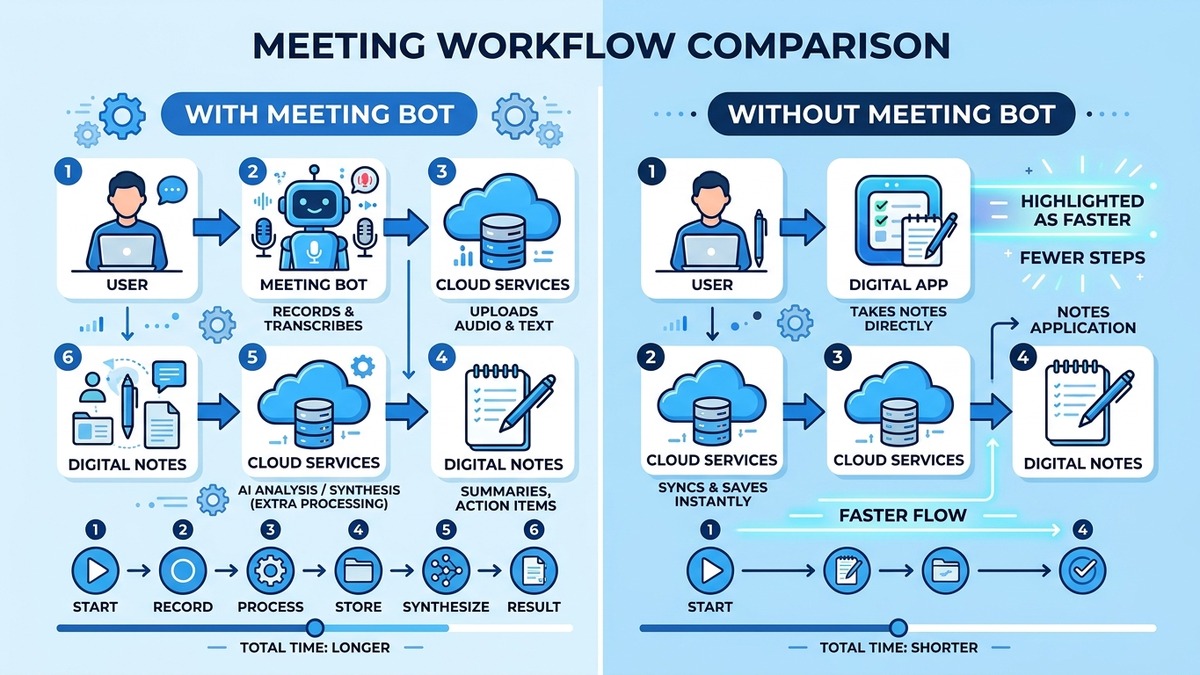
Felo Subtitles takes a fundamentally different approach to ai note taking. Instead of joining your meeting as a visible bot participant (which many attendees find intrusive), Felo captures system audio directly on your device. The result: accurate transcription with zero social friction.
What sets Felo apart as an ai note taker:
- Real-time transcription + translation in 15 languages. Felo does not just transcribe — it translates the transcript into your preferred language on the fly. A team call with Japanese, English, and Chinese speakers produces a unified, multilingual record.
- No meeting bot. Unlike tools that inject a “Notetaker” participant into your Zoom or Google Meet room, Felo works at the system-audio level. No one on the call knows you are recording, and there is no awkward “Allow the bot?” prompt.
- Speaker identification. Felo tags each speaker so you can tell who said what, even in fast-paced discussions.
- AI summaries and action items. After the meeting, Felo generates a structured summary with key decisions and to-dos.
- Export flexibility. Export notes as TXT, SRT subtitle files, or copy directly to your clipboard.
Pricing: Free tier available with generous usage. Premium plans unlock unlimited minutes and advanced features.
Who should use it: Product teams spanning multiple countries, freelancers conducting interviews in foreign languages, students attending lectures delivered in a second language, and anyone who wants an ai meeting notes solution that stays invisible.
For a hands-on walkthrough, check out our Google Meet transcription test — it shows exactly how Felo handles a live meeting.
2. Otter.ai
Best for: English-only teams that want mature calendar integrations and a large ecosystem.
Otter.ai is one of the most recognized names in ai note taking. It joins Zoom, Google Meet, and Microsoft Teams calls via a bot, records the audio, and produces time-stamped transcripts with speaker labels.
Strengths:
- Strong English transcription accuracy (reported WER around 5-6% on clear audio)
- Automatic calendar sync — Otter joins scheduled meetings without manual setup
- Collaboration features: highlight, comment, and assign action items within transcripts
- OtterPilot generates a summary and follow-up email draft
Limitations:
- Language support is limited to English — a dealbreaker for multilingual teams
- The meeting bot is visible to all participants, which can feel intrusive
- Free tier caps at 300 minutes per month and 30 minutes per conversation
- Advanced features (CRM integrations, custom vocabulary) require the Business plan at $20 per user per month
Verdict: A solid choice if your organization operates entirely in English and values deep calendar automation. For teams needing even one non-English language, look elsewhere.
For a deeper dive into alternatives, read our full Otter.ai alternatives comparison.
3. Notion AI
Best for: Users already embedded in the Notion ecosystem who want AI summaries without switching tools.
Notion AI is not a standalone meeting transcription app. Instead, it layers AI capabilities on top of Notion’s existing workspace — summarizing pages, drafting text, and extracting action items from meeting notes you paste in.
Strengths:
- Seamless integration with Notion databases, wikis, and project boards
- AI can summarize, translate, and rewrite existing notes
- No additional app to install if you already use Notion
- Affordable add-on pricing ($10 per member per month on top of existing Notion plan)
Limitations:
- No live audio transcription — you must bring your own transcript or type notes manually
- Not a true ai note taker in the “attend my meeting” sense
- AI features are generative, not specialized for meeting workflows
- Limited offline support
Verdict: Best treated as an AI layer for written notes rather than a replacement for a dedicated transcription tool. Pair it with a real-time transcriber like Felo Subtitles for end-to-end coverage.
4. Fireflies.ai
Best for: Sales and customer-success teams that need CRM integration and conversation intelligence.
Fireflies.ai records, transcribes, and analyzes meetings with a focus on business conversations. Its “Topic Tracker” feature flags mentions of pricing, competitors, and objections — making it popular with revenue teams.
Strengths:
- Integrates with Salesforce, HubSpot, and other CRMs to auto-log call summaries
- Topic and sentiment tracking across calls
- Supports 60+ languages for transcription (though accuracy varies outside English)
- AskFred chatbot lets you query your meeting archive in natural language
Limitations:
- Meeting bot is visible to all participants
- Free plan is restrictive: limited transcription credits and no AI summaries
- Real-time translation is not available — only post-meeting transcription in other languages
- Pro plan starts at $19 per seat per month
Verdict: A strong pick for sales organizations that live in a CRM and want conversation analytics. Less compelling for general-purpose ai meeting notes.
5. tl;dv
Best for: Teams that want to clip and share specific moments from meetings, not just full transcripts.
tl;dv (short for “too long; didn’t view”) emphasizes video highlights. You can timestamp key moments during a live call, and the tool creates short clips with the corresponding transcript — ideal for async teams that need to “attend” a meeting in 5 minutes instead of 60.
Strengths:
- Timestamped highlights and shareable video clips
- Free unlimited recording on Zoom and Google Meet
- AI-generated summaries with action items
- Supports 30+ languages for transcription
Limitations:
- Microsoft Teams integration is newer and less stable
- Video clip sharing requires recipients to have a tl;dv account (or use a public link)
- Advanced AI features (recurring meeting insights, CRM push) are on paid plans starting at $25 per user per month
- No real-time translation
Verdict: Excellent for product and design teams that review meeting recordings asynchronously. The clip-based workflow is genuinely useful — but the lack of translation limits its appeal for global teams.
6. Notta
Best for: Users who need strong East Asian language support (Japanese, Chinese, Korean) alongside English.
Notta positions itself as a multilingual ai note taker with particular strength in Japanese and Chinese. It offers both real-time transcription and file upload, plus basic translation between supported languages.
Strengths:
- High accuracy for Japanese and Chinese audio (a weak spot for many Western-first tools)
- Real-time transcription for live meetings
- Chrome extension for browser-based meeting platforms
- Affordable pricing starting at $14.99 per month
Limitations:
- Translation quality lags behind dedicated translation engines
- Fewer integrations compared to Otter.ai or Fireflies.ai
- The desktop app can be resource-heavy on older machines
- Speaker identification accuracy drops in meetings with more than 4 participants
Verdict: A practical choice for bilingual (English-Japanese or English-Chinese) workflows. However, for teams working across three or more languages with simultaneous real-time translation, Felo Subtitles offers a more seamless experience.
7. Microsoft Copilot (in Teams)
Best for: Organizations fully committed to the Microsoft 365 ecosystem.
Microsoft Copilot, integrated into Teams, brings AI note-taking directly into the meeting platform itself. It generates meeting recaps, action items, and follow-up tasks — all within the Teams interface.
Strengths:
- Native integration: no third-party bot, no separate app
- Leverages enterprise-grade Microsoft security and compliance (SOC 2, ISO 27001, GDPR)
- Summarizes meeting chats as well as spoken audio
- Supports 16 languages for transcription
Limitations:
- Requires a Microsoft 365 Copilot license ($30 per user per month on top of existing M365 subscription)
- Only works within Microsoft Teams — not compatible with Zoom or Google Meet
- AI features are tied to the broader Copilot experience and cannot be used standalone
- Transcription accuracy for non-English languages is inconsistent
Verdict: The default choice for Microsoft-heavy enterprises. The high per-seat cost and Teams lock-in make it impractical for smaller organizations or multi-platform workflows.
8. Grain
Best for: Customer research teams that need to catalog and tag insights from user interviews.
Grain records video meetings and lets you tag, clip, and organize highlights into a shared “insight library.” It is designed for UX researchers, product managers, and customer-facing teams that run dozens of interviews per quarter.
Strengths:
- Purpose-built for qualitative research workflows
- Tagging and highlight reels make synthesis faster
- Integrates with Notion, Slack, and Linear for insight distribution
- Free plan includes 20 meetings per month with AI summaries
Limitations:
- Not designed for general-purpose ai note taking — the workflow centers on research, not everyday meetings
- Language support is limited (primarily English)
- No real-time translation
- Paid plans start at $19 per seat per month
Verdict: If your primary use case is customer interviews and you need a structured insight repository, Grain is hard to beat. For day-to-day meeting transcription, it is overspecialized.
If you also need to transcribe recorded video files rather than live meetings, our guide on how to transcribe MP4 video to text covers the best methods.
AI Note-Taking Apps Comparison Table
| App | Real-Time Transcription | Languages | Live Translation | Free Tier | Export Formats |
|---|---|---|---|---|---|
| Felo Subtitles | Yes | 15 | Yes (real-time) | Yes | TXT, SRT, clipboard |
| Otter.ai | Yes | 1 (English) | No | 300 min/month | TXT, PDF, DOCX, SRT |
| Notion AI | No | N/A (text only) | Post-hoc only | No (paid add-on) | Notion export formats |
| Fireflies.ai | Yes | 60+ | No | Limited credits | TXT, PDF, DOCX, CSV |
| tl;dv | Yes | 30+ | No | Unlimited recording | TXT, video clips |
| Notta | Yes | 58 | Basic | 120 min/month | TXT, PDF, DOCX, SRT |
| Microsoft Copilot | Yes (Teams only) | 16 | No | No | Teams recap, DOCX |
| Grain | Yes | ~5 | No | 20 meetings/month | Video clips, TXT |
How to Choose the Right AI Note-Taking App
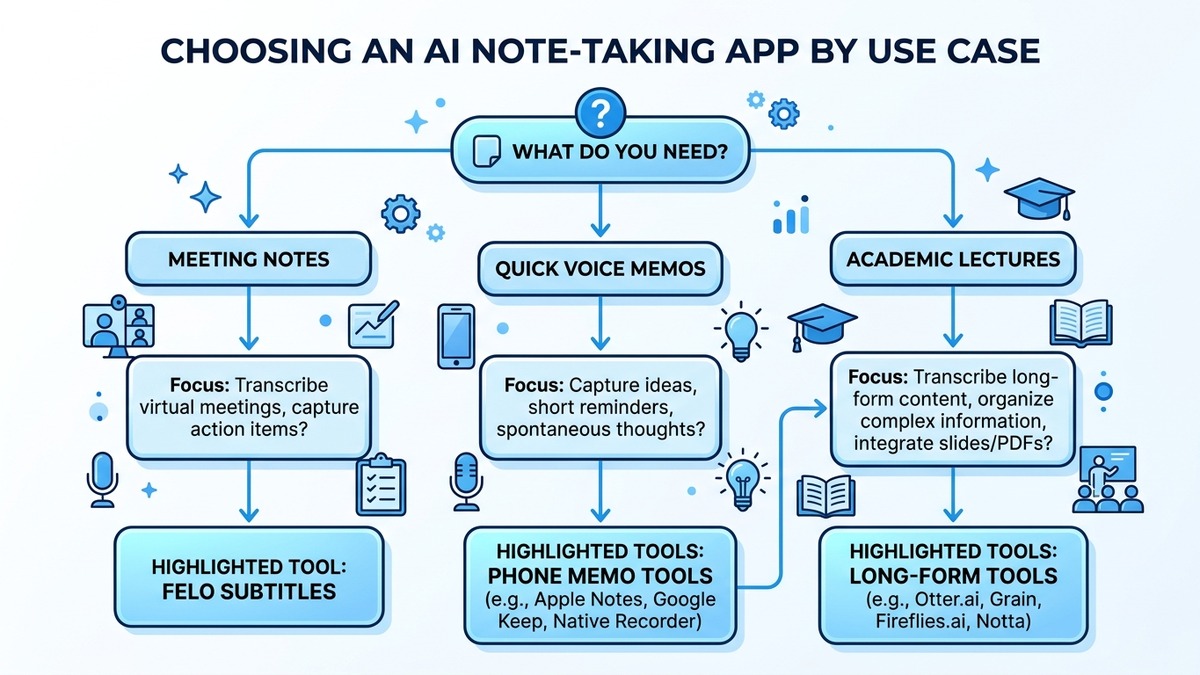
With eight strong options on the table, the best choice depends on your specific situation. Here is a decision framework based on common use cases.
You work on a multilingual team
If your meetings involve two or more languages — whether that is English and Japanese, Mandarin and Spanish, or any other combination — real-time translation is non-negotiable. Among the tools reviewed, only Felo Subtitles provides simultaneous translation during a live meeting. Other tools require you to transcribe first, then translate after the fact, which breaks the flow of collaboration.
You are a solo professional or freelancer
For individual users who attend a moderate number of meetings per month, cost and simplicity matter most. Felo Subtitles and tl;dv both offer generous free tiers. If you only need English, Otter.ai’s free plan is also viable — though the 30-minute-per-conversation cap can be restrictive.
Your organization runs on Microsoft 365
If your company has already purchased Microsoft 365 Copilot licenses and uses Teams for all meetings, adding a third-party tool creates unnecessary friction. Microsoft Copilot’s native integration is the path of least resistance — just be aware of its limitations outside the Microsoft ecosystem.
You need conversation intelligence for sales
Revenue teams that want to track competitor mentions, analyze sentiment, and push summaries to a CRM should evaluate Fireflies.ai. Its Topic Tracker and CRM integrations are purpose-built for that workflow.
You conduct user research interviews
Grain’s highlight reel and insight library features make it the strongest option for UX researchers who need to synthesize dozens of interviews into actionable themes. Pair it with a real-time transcriber if you also attend multilingual meetings.
You want AI notes without a bot joining your call
Meeting bots create friction: attendees notice them, some feel surveilled, and certain organizations block third-party bots entirely. If no-bot architecture is important, Felo Subtitles captures system audio directly, leaving no trace in the meeting participant list.
For tips on transcribing voice memos and recordings outside of meetings, check out our guide on voice memo transcription.
Frequently Asked Questions
What is the best AI note-taking app in 2026?
Based on our evaluation, Felo Subtitles is the best overall AI note-taking app in 2026 for users who need multilingual support, real-time translation, and a no-bot architecture. For English-only teams deeply integrated with calendar tools, Otter.ai remains a strong alternative. The right choice depends on your language needs, budget, and existing tech stack.
Are AI note-taking apps accurate enough to replace manual notes?
Yes, for most professional use cases. Leading AI note takers achieve word error rates between 4% and 8% on clear audio with native speakers. Accuracy drops in noisy environments or with heavy accents, but the output is typically detailed enough to capture all key points — far more reliably than handwritten notes. We recommend reviewing AI-generated notes after each meeting for the first week to calibrate your trust in the tool.
Do AI note-taking apps work with Zoom, Google Meet, and Microsoft Teams?
Most apps support all three major platforms, though the integration method varies. Bot-based tools (Otter.ai, Fireflies.ai, tl;dv) join your meeting as a participant. System-audio-based tools like Felo Subtitles work regardless of the platform — including niche tools like Webex, Discord, or even phone calls — because they capture audio at the operating system level rather than through a platform-specific API.
Is it legal to record meetings with an AI note taker?
Legality depends on your jurisdiction and company policy. In most U.S. states, one-party consent applies, meaning you can record if you are a participant. In some states (California, Illinois) and countries (Germany, Japan), all-party consent is required. Always check local laws and inform meeting participants when recording. Many organizations add a brief verbal notice at the start of each call.
Can AI note-taking apps translate meetings in real time?
Very few can. Most tools transcribe in the spoken language and offer post-meeting translation, which introduces a delay. Felo Subtitles is one of the few tools that provides genuine real-time translation — the translated text appears on your screen within seconds of the speaker finishing a sentence, covering 15 languages simultaneously.
How much do AI note-taking apps cost?
Pricing ranges from completely free (with limitations) to $30 per user per month for enterprise solutions. Felo Subtitles offers a free tier suitable for regular use. Otter.ai and tl;dv have free plans with caps on minutes or features. Microsoft Copilot is the most expensive at $30 per user per month, but it bundles AI note-taking with broader productivity features across the Microsoft 365 suite.
Summary: Finding Your Best AI Note-Taking App
The best ai note taking app is the one that matches your real workflow — not the one with the longest feature list. Here is a quick recap of our recommendations:
- Best overall (especially for multilingual teams): Felo Subtitles — real-time transcription, live translation in 15 languages, no meeting bot, and a generous free tier
- Best for English-only calendar automation: Otter.ai
- Best for sales conversation intelligence: Fireflies.ai
- Best for async video highlights: tl;dv
- Best for Japanese/Chinese bilingual workflows: Notta
- Best for Microsoft 365 enterprises: Microsoft Copilot
- Best for user research: Grain
- Best AI layer for existing notes: Notion AI
If your meetings cross language barriers — and in 2026, more teams operate across borders than ever — start with Felo Subtitles. The combination of real-time translation, invisible recording, and structured AI summaries solves problems that most ai meeting notes tools have not even addressed.
Never miss a detail in meetings again — let AI take notes for you
Free to start · No credit card required