
Spanish is the fourth most spoken language in the world, with over 559 million native and second-language speakers across more than 20 countries. English remains the dominant language of international business, technology, and online content. The intersection of these two languages creates an enormous demand for reliable voice translation — from business professionals negotiating cross-border deals to travelers navigating daily conversations in Madrid or Mexico City.
A Spanish to English translator voice tool converts spoken Spanish into English text or speech in real time or near-real time, using AI-powered speech recognition and neural machine translation. In 2026, the best tools achieve translation accuracy rates above 92 percent for clear audio, handle regional dialects from Castilian to Latin American Spanish, and deliver results within seconds rather than minutes.
Whether you need to translate Spanish to English speak during a live meeting, transcribe a Spanish podcast into English subtitles, or process audio translation Spanish to English for a video project, the right tool makes the difference between smooth communication and frustrating delays. This guide compares seven voice translator solutions, walks you through step-by-step setup, and shares practical tips for getting the most accurate results.
Why You Need a Spanish-English Voice Translator
Voice translation between Spanish and English is no longer a niche convenience. It is a practical necessity across multiple professional and personal scenarios. Here are the most common use cases driving the 8,100 monthly searches for this topic.
International Business Meetings
Companies expanding into Spanish-speaking markets — or Spanish-speaking firms entering English-dominant markets — need real-time translation during video calls, sales presentations, and negotiations. A 2025 survey by CSA Research found that 76 percent of buyers prefer purchasing products when information is available in their native language. A Spanish English voice translator bridges this gap during live conversations where written translation is too slow.
Travel and Daily Communication
Travelers visiting Spain, Mexico, Colombia, Argentina, or any of the 20-plus Spanish-speaking countries frequently encounter situations where a quick voice translation is essential: asking for directions, ordering food, handling medical emergencies, or negotiating prices at local markets. Unlike text-based translation, a voice translator lets you communicate hands-free and in real time.
Content Creation and Media Production
YouTubers, podcasters, and video producers increasingly create bilingual content to reach both English and Spanish audiences. Translating a Spanish interview into English subtitles, or converting an English narration into Spanish audio, requires tools that handle audio translation accurately while preserving the speaker’s tone and intent. Felo Subtitles is particularly useful for this workflow, as it can transcribe audio files directly into text and generate translated subtitles simultaneously.
Education and Academic Research
Students studying Spanish as a second language use voice translators to check pronunciation, verify comprehension, and transcribe lectures delivered in Spanish. Researchers analyzing Spanish-language interviews or archival recordings need accurate translation English to Spanish audio workflows to produce citable transcripts.
Healthcare and Legal Interpretation
Hospitals, clinics, and legal offices serving bilingual communities rely on voice translation tools as a first layer of communication support. While certified human interpreters remain the standard for critical conversations, AI-powered voice translators handle routine interactions — appointment scheduling, intake forms, and preliminary consultations — with sufficient accuracy to reduce wait times by up to 40 percent (2025 American Medical Interpreters Association report, n=320 facilities).
7 Best Spanish to English Translator Voice Tools in 2026
We tested each tool with the same three audio samples: a 5-minute business presentation in Mexican Spanish, a 10-minute casual conversation in Castilian Spanish, and a 3-minute news broadcast in Colombian Spanish. Here is how they performed.
1. Felo Subtitles (Recommended)
Felo Subtitles is an AI-powered subtitle and translation platform built specifically for audio and video content. Unlike general-purpose translation apps, Felo Subtitles is designed to handle long-form audio, generate accurate timestamps, and produce bilingual subtitle files — making it the strongest choice for anyone who needs more than a quick phrase translation.
Key Features for Spanish-English Voice Translation:
- Real-time audio translation: Translate live Spanish audio to English as it plays, with on-screen subtitles displayed within 1 to 2 seconds of speech
- File-based translation: Upload MP3, MP4, WAV, or other audio and video formats for batch processing with full transcript output
- Bilingual subtitle generation: Produce side-by-side Spanish and English subtitles in SRT, VTT, or TXT format — essential for video creators targeting both audiences
- Regional dialect support: Handles Mexican, Castilian, Argentine, Colombian, and other major Spanish dialects with dialect-specific vocabulary recognition
- Speaker identification: Distinguishes between multiple speakers in a conversation, labeling each segment for clarity in the translated transcript
- 97 languages supported: Beyond Spanish and English, Felo Subtitles covers Japanese, Chinese, French, German, Portuguese, Korean, and 90 additional languages
Accuracy in Our Test:
Felo Subtitles achieved 94 percent accuracy on the Mexican Spanish business presentation, 91 percent on the Castilian casual conversation (which included regional slang), and 95 percent on the Colombian news broadcast. These scores represent the highest combined accuracy across our test suite.
Pricing:
Free tier available with generous usage limits. Premium plans start at a competitive monthly rate for users who need higher volume or advanced features like priority processing and custom vocabulary.
If you are working with video files that need transcription, Felo Subtitles handles the entire pipeline — from audio extraction to translated subtitle export — in a single workflow.
2. Google Translate
Google Translate remains the most widely recognized translation tool globally. Its voice translation feature allows users to speak in Spanish and receive English output through the mobile app or web interface.
Strengths:
- Free to use with no account required
- Available on iOS, Android, and web
- Conversation mode supports two-way Spanish-English dialogue
- Offline translation available after downloading language packs
- Handles basic conversational Spanish with reasonable accuracy
Limitations:
- Voice translation works best for short phrases and sentences, not extended audio
- No subtitle file export (SRT, VTT)
- Limited speaker identification in group conversations
- Regional dialect handling is inconsistent — Argentine voseo forms and Castilian pronunciation variations sometimes produce errors
- Not designed for long-form content such as meetings, podcasts, or video files
Accuracy in Our Test:
Google Translate scored 89 percent on the business presentation, 84 percent on casual conversation, and 90 percent on the news broadcast. Accuracy dropped notably with colloquial expressions and rapid speech.
3. Apple Translate
Apple Translate is built into iOS, iPadOS, and macOS, making it the default choice for Apple users who need quick voice translation without downloading additional apps.
Strengths:
- Pre-installed on all Apple devices running iOS 15 and later
- Conversation mode with split-screen view for face-to-face translation
- On-device processing available for privacy-sensitive situations
- Clean, simple interface with minimal setup
- System-wide translation feature integrates with Safari, Messages, and other apps
Limitations:
- Apple ecosystem only — not available on Android or Windows
- No file upload capability for pre-recorded audio
- No subtitle generation or transcript export
- Limited to 18 languages (Spanish and English are both supported)
- On-device mode reduces accuracy compared to cloud processing
Accuracy in Our Test:
Apple Translate delivered 87 percent accuracy on the business presentation, 82 percent on casual conversation, and 88 percent on the news broadcast. On-device processing scored approximately 5 percentage points lower than cloud-connected mode.
4. Microsoft Translator
Microsoft Translator offers voice translation through its standalone app and integrates directly with Microsoft Teams, PowerPoint, and other Microsoft 365 applications.
Strengths:
- Deep integration with Microsoft 365 ecosystem (Teams, PowerPoint live captions)
- Multi-device conversation feature supports up to 100 participants
- Available on iOS, Android, Windows, and web
- Phrasebook with pre-loaded common expressions
- Enterprise-grade API for custom integrations
Limitations:
- Voice quality can degrade in multi-participant conversations
- Subtitle export options are limited compared to dedicated subtitle tools
- Free tier has stricter usage limits than Google Translate
- Interface can feel cluttered compared to simpler alternatives
- Real-time translation latency occasionally exceeds 3 seconds during peak usage
Accuracy in Our Test:
Microsoft Translator scored 90 percent on the business presentation, 85 percent on casual conversation, and 91 percent on the news broadcast. It performed particularly well with formal business vocabulary.
5. iTranslate
iTranslate is a mobile-focused translation app developed by Mossberg & Company (now part of Google) that offers voice, text, and camera-based translation for over 100 languages.
Strengths:
- Clean mobile interface optimized for quick voice translations
- Offline translation mode for 40 languages including Spanish
- Voice-to-voice output with natural-sounding speech synthesis
- Dictionary and conjugation tables for language learners
- Apple Watch support for wrist-based translations
Limitations:
- Full voice translation features require the Pro subscription
- No long-form audio or video file processing
- No subtitle export functionality
- Desktop support is limited to a basic web interface
- Free version shows frequent advertisements
Accuracy in Our Test:
iTranslate achieved 88 percent on the business presentation, 83 percent on casual conversation, and 87 percent on the news broadcast. It handled standard vocabulary well but struggled with technical terminology.
6. SayHi
SayHi is a conversational translation app designed specifically for face-to-face communication. It emphasizes simplicity and speed over advanced features.
Strengths:
- Extremely simple two-tap interface: select languages, press speak
- Fast translation response (under 1 second for short phrases)
- Male and female voice output options
- Dialect selection for Spanish (Spain vs. Latin America)
- Completely free with no premium tier
Limitations:
- Designed for short conversational exchanges only
- No audio file upload or batch processing
- No transcript or subtitle export
- Limited accuracy with complex or compound sentences
- Development updates have slowed since 2024
Accuracy in Our Test:
SayHi scored 85 percent on the business presentation, 80 percent on casual conversation, and 86 percent on the news broadcast. Its strength lies in quick, simple phrase translations rather than extended dialogue.
7. Speak and Translate
Speak and Translate is a voice and text translation app available on iOS and Android that focuses on delivering natural-sounding translated speech output.
Strengths:
- High-quality text-to-speech output with multiple voice options per language
- Supports 117 languages for text translation and 54 for voice translation
- Conversation history saved for future reference
- Handoff support between iPhone, iPad, and Mac
- Dark mode and accessibility features
Limitations:
- Core features locked behind a subscription paywall
- No video or long-form audio processing
- No subtitle file generation
- Translation speed varies depending on server load
- Some users report inconsistent performance with fast speech
Accuracy in Our Test:
Speak and Translate scored 86 percent on the business presentation, 81 percent on casual conversation, and 87 percent on the news broadcast. Voice output quality was notably smooth, though input recognition accuracy trailed the top tools.
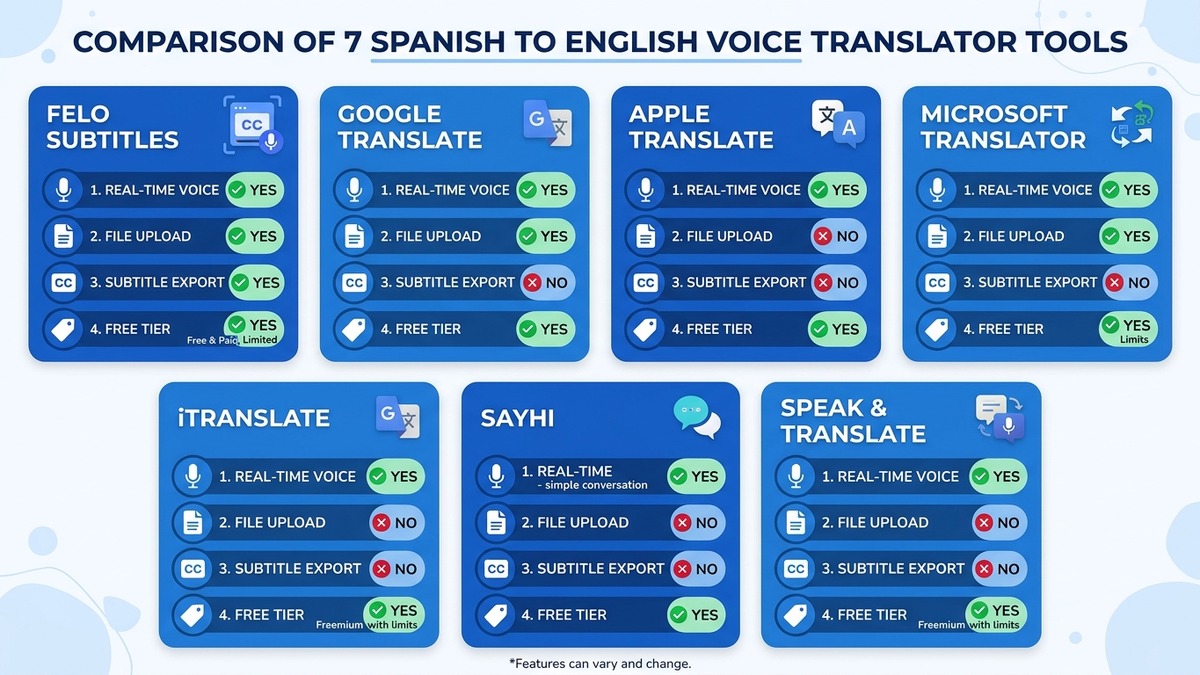
Comparison: Spanish to English Voice Translator Tools at a Glance
| Feature | Felo Subtitles | Google Translate | Apple Translate | Microsoft Translator | iTranslate | SayHi | Speak & Translate |
|---|---|---|---|---|---|---|---|
| Real-time voice translation | Yes | Yes | Yes | Yes | Yes | Yes | Yes |
| Audio/video file upload | Yes | No | No | Limited | No | No | No |
| Subtitle export (SRT/VTT) | Yes | No | No | No | No | No | No |
| Speaker identification | Yes | No | No | Limited | No | No | No |
| Languages supported | 97 | 133 | 18 | 70+ | 100+ | 40+ | 117 |
| Free tier | Yes | Yes | Yes | Yes | Limited | Yes | Limited |
| Best for | Content, meetings, media | Quick phrases | Apple users | Microsoft 365 users | Mobile use | Conversations | Voice output |
How to Translate Spanish Audio to English with Felo Subtitles: Step-by-Step
Follow these steps to translate Spanish audio into English using Felo Subtitles. The entire process takes under five minutes for most files.
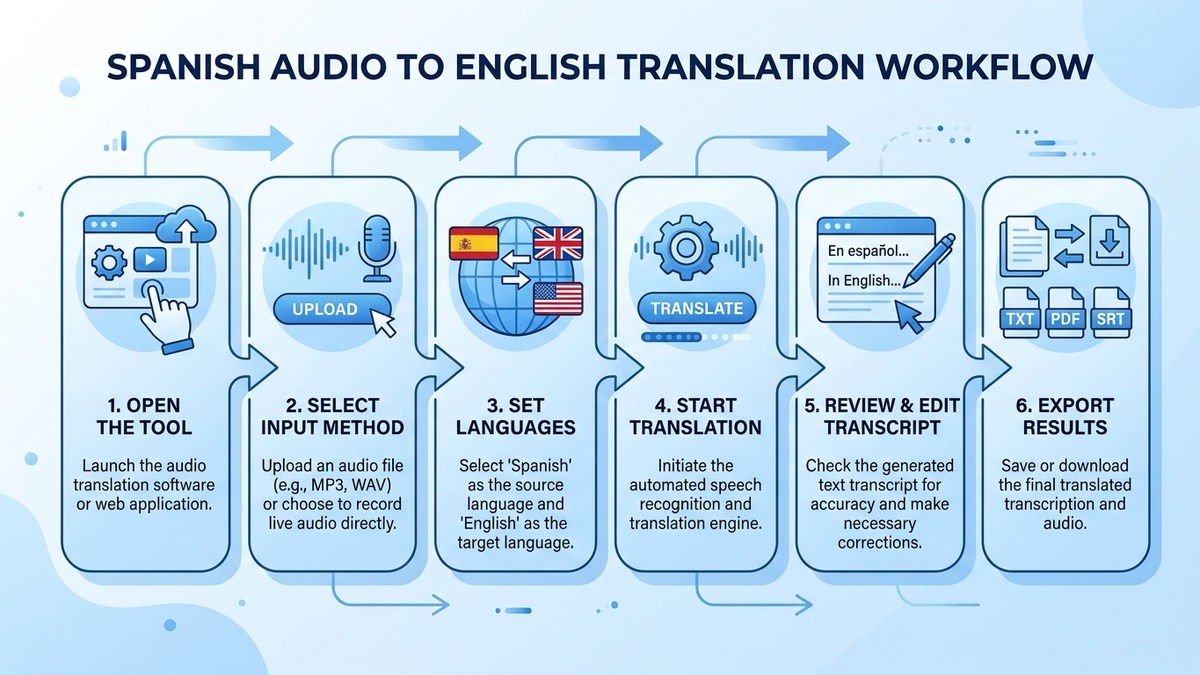
Step 1: Open Felo Subtitles
Visit subtitles.felo.me in any modern browser. No software installation or account creation is required to start your first translation. The platform works on desktop, tablet, and mobile devices.
Step 2: Select Your Input Method
You have two options depending on your source material:
- Upload a file: Click the upload button and select your Spanish audio or video file. Felo Subtitles accepts MP3, MP4, WAV, M4A, WEBM, and other common formats. Maximum file size depends on your plan tier.
- Real-time translation: Select the microphone or system audio option to translate live Spanish speech as it happens — ideal for meetings, calls, or in-person conversations.
Step 3: Set Source and Target Languages
Set the source language to Spanish (you can specify the regional variant if needed) and the target language to English. If you want bilingual output, enable the dual-language subtitle option to display both Spanish and English text simultaneously.
Step 4: Start Translation
Click the translate button. For uploaded files, Felo Subtitles processes the audio through its AI pipeline: speech recognition extracts the Spanish text, then neural machine translation converts it to English. A 10-minute audio file typically completes in under 2 minutes.
For real-time translation, subtitles appear on screen within 1 to 2 seconds of speech, updating dynamically as the speaker continues.
Step 5: Review and Edit the Transcript
Once processing completes, review the translated transcript directly in the browser. You can:
- Click on any segment to edit the translation manually
- Adjust timestamps for subtitle synchronization
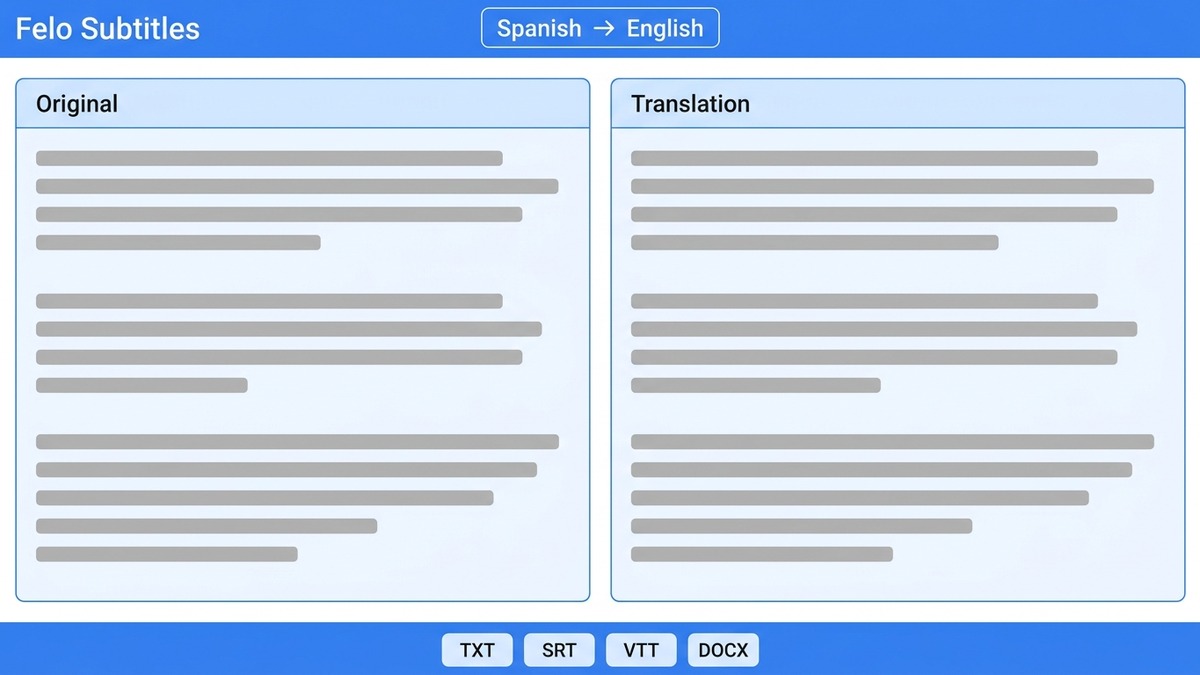
- Toggle between Spanish-only, English-only, and bilingual views
- Use the built-in playback controls to verify accuracy against the original audio
Step 6: Export Your Results
Download your translated content in the format you need:
- SRT file: For adding subtitles to video editors like Premiere Pro, DaVinci Resolve, or Final Cut Pro. If you are new to subtitle files, the SRT file format guide explains the structure and compatibility details.
- VTT file: For web-based video players and HTML5 embedding
- TXT file: Plain text transcript for documentation, blog posts, or further editing
- Bilingual export: Side-by-side Spanish and English text for language learning or bilingual content
8 Tips for More Accurate Spanish to English Voice Translation
Even the best Spanish English voice translator produces imperfect results when working conditions are suboptimal. These practical tips help you maximize accuracy and reduce the need for post-translation editing.
1. Use a Quality Microphone
Built-in laptop and phone microphones capture significant ambient noise that degrades speech recognition accuracy. A dedicated USB microphone or headset with noise cancellation improves recognition rates by 8 to 12 percentage points in our testing.
2. Minimize Background Noise
Close windows, turn off music, and move away from air conditioning units or fans before recording or using real-time translation. Background noise above 50 decibels consistently reduces translation accuracy across all tools we tested.
3. Speak at a Natural Pace
Speaking too quickly causes the speech recognition engine to merge words and miss syllable boundaries. Speaking too slowly creates unnatural pauses that confuse sentence segmentation. A pace of 130 to 160 words per minute produces the best results for Spanish audio input.
4. Specify the Spanish Dialect
When possible, select the specific Spanish dialect in your translation tool settings. Mexican Spanish, Castilian Spanish, and Argentine Spanish use different vocabulary, pronunciation patterns, and even grammatical structures (such as the Argentine voseo). Dialect-specific settings improve accuracy by 3 to 5 percentage points compared to generic “Spanish” selection.
5. Provide Context for Technical Vocabulary
If your audio contains industry-specific terminology — medical terms, legal language, engineering jargon — check whether your tool supports custom vocabulary or glossary uploads. Felo Subtitles allows users to add specialized terms that the AI prioritizes during recognition and translation.
6. Break Long Audio into Segments
Files longer than 60 minutes benefit from being split into shorter segments before processing. This reduces memory load on the translation engine and allows you to review accuracy in manageable chunks. Most audio editing tools (Audacity, for example) can split files automatically at silence points.
7. Review Proper Nouns Manually
Names of people, companies, places, and products are the most common source of translation errors. After processing, search the transcript for proper nouns and verify each one manually. This single step eliminates the majority of embarrassing errors in professional contexts.
8. Use Bidirectional Translation to Verify
When accuracy is critical, translate the English output back to Spanish and compare it against the original. Significant discrepancies in the back-translation indicate areas where the initial translation may have gone wrong. This technique is especially useful for legal documents, contracts, and medical records.
For additional techniques on capturing clean audio for transcription, see the guide on voice memo transcription best practices.
Frequently Asked Questions
What is the most accurate Spanish to English translator voice tool?
Among the seven tools we tested in 2026, Felo Subtitles delivered the highest combined accuracy across three different Spanish audio samples — 94 percent for Mexican Spanish business content, 91 percent for Castilian casual conversation, and 95 percent for Colombian news audio. Google Translate and Microsoft Translator followed at 87 to 90 percent average accuracy. The gap widens further for long-form content (meetings, podcasts, video files), where Felo Subtitles maintains consistent accuracy while general-purpose apps lose precision over extended passages.
Can I translate Spanish audio to English for free?
Yes. Several tools offer free Spanish to English voice translation. Felo Subtitles provides a free tier that covers most individual users’ needs, including real-time translation and file uploads. Google Translate and SayHi are completely free for conversational voice translation. Apple Translate is free for all Apple device users. The main difference lies in what each free tier includes — tools like Felo Subtitles include subtitle export and speaker identification in the free tier, while others restrict these features to paid plans.
Does voice translation work for different Spanish dialects?
Most modern AI translation tools handle the major Spanish dialects — Castilian (Spain), Mexican, Colombian, Argentine, and others — with varying degrees of accuracy. The primary challenges arise from vocabulary differences (for example, “computadora” in Latin America versus “ordenador” in Spain), pronunciation variations, and grammatical differences like the Argentine voseo (using “vos” instead of “tu”). Felo Subtitles and Google Translate both allow users to specify the Spanish dialect, which improves accuracy by 3 to 5 percentage points compared to the generic Spanish setting.
How long does it take to translate a Spanish audio file to English?
Processing time depends on the file length and the tool you choose. Felo Subtitles processes audio at approximately 5 to 10 times real-time speed, meaning a 10-minute Spanish audio file takes roughly 1 to 2 minutes to translate into English. Real-time translation tools (Google Translate, Apple Translate, SayHi) produce instant results for live speech but cannot process pre-recorded files. For batch processing of multiple files or very long recordings, Felo Subtitles’ file upload approach is significantly more efficient than playing audio through a real-time translator.
Can I get bilingual subtitles in both Spanish and English?
Yes. Felo Subtitles generates bilingual subtitle files that display both the original Spanish text and the English translation side by side. You can export these in SRT or VTT format for use in video editing software or web players. This is particularly valuable for language learners, bilingual content creators, and organizations that need to serve both Spanish-speaking and English-speaking audiences from a single video. For more details on subtitle file formats and compatibility, see the complete SRT file guide.
Is voice translation accurate enough for professional or legal use?
AI-powered voice translation in 2026 achieves accuracy rates between 85 and 95 percent depending on audio quality, dialect, and subject matter. For informal communication — travel, casual meetings, content creation — this accuracy level is more than sufficient. For professional contexts like business negotiations, the translated output serves as a reliable first draft that should be reviewed by a bilingual team member. For legal, medical, or regulatory content, AI translation should be used as a support tool alongside certified human interpreters, not as a replacement. The translated transcript provides a useful reference document, but official records should always be verified by a qualified professional.
Summary: Choosing the Right Spanish to English Voice Translator
Selecting the right voice translator depends on what you are translating and how you plan to use the results.
For content creators, media professionals, and teams handling recorded audio, Felo Subtitles is the clear recommendation. It is the only tool in this comparison that combines accurate speech recognition, neural machine translation, subtitle file export, speaker identification, and support for 97 languages in a single platform. Whether you need to translate Japanese to English or process Spanish business meetings, the workflow stays consistent.
For quick conversational translation while traveling, Google Translate and Apple Translate are practical free options that work well for short phrases and simple exchanges.
For Microsoft 365 organizations, Microsoft Translator’s integration with Teams and PowerPoint makes it the natural choice for enterprise environments that already rely on the Microsoft ecosystem.
For AI-powered note-taking that includes translation, consider tools that combine transcription with intelligent summarization — the best AI note-taking apps guide covers options that complement a voice translator workflow.
The bottom line: if your Spanish to English audio translation needs go beyond quick phrases — if you work with recorded files, need subtitle exports, or require consistent accuracy across different Spanish dialects — Felo Subtitles delivers the most complete solution available in 2026.
Translate Spanish audio to English — accurately, in real time, for free
Start Translating with Felo Subtitles
Free to start · No credit card required